نکته :
خروجی هر دستور به صورت عکس هم قرار گرفته برای درک بهتر
اگه عکس ها دیده نمیشن از ادرس زیر میتونین عکس هارو ببینین (( شماره هر عکس رو بالاش با رنگ ابی قرار دادم ))
Index of /image/grep-pic
یا از این ادرس دانلود کنین
http://ubuntuone.com/p/15nL/

دستور grep برای پیدا کردن یک نوشته در بین تعداد زیادی نوشته استفاده میشه که خروجیش میتونه به صورت های مختلف باشه مثلا :
خط هایی که اون نوشته مورد نظر رو دارا هستن رو نشون بده
تعداد خط هایی که نوشته در انها منطبق شده نشون بدهد
....
..
.
شکل کلی دستور
کد:
grep [OPTION]... PATTERN [FILE]...
یا
کد:
grep "literal_string" filename
نکته :
در طی اموزش از 3 فایل به نام های demo و demo2 و demo3 استفاده میشه که متن داخلشون به ترتیب به صورت زیر هست
demo
کد:
alieblice@de-10:~$ cat demo
THIS LINE IS THE 1ST UPPER CASE LINE IN THIS FILE.
this line is the 1st lower case line in this file.
This Line Has All Its First Character Of The Word With Upper Case.

Two lines above this line is empty.
And this is the last line
.
demo2
کد:
alieblice@de-10:~$ cat demo2
THIS LINE IS THE 1ST UPPER CASE LINE IN THIS FILE.
this line is the 1st lower case line in this file.
This Line Has All Its First Character Of The Word With Upper Case.

Two lines above this line is empty.
And this is the last line.
demo3
کد:
alieblice@de-10:~$ cat demo3
4. Vim Word Navigation

You may want to do several navigation in relation to the words, such as:

 * e - go to the end of the current word.
 * E - go to the end of the current WORD.
 * b - go to the previous (before) word.
 * B - go to the previous (before) WORD.
 * w - go to the next word.
 * W - go to the next WORD.

WORD - WORD consists of a sequence of non-blank characters, separated with white space.
word - word consists of a sequence of letters, digits and underscores.

Example to show the difference between WORD and word

 * 192.168.1.1 - single WORD
 * 192.168.1.1 - seven words.
جستوجو برای یک کلمه در متن
این دستور ساده ترین نوع دستور grep هستش که به صورت زیر عمل میکنیم
کد:
grep "literal_string" filename
مثال
قبل از زدن دستور زیر فایل demo رو با محتویاتی که اول اموزش گذاشتم بسازید
در مثال زیر به دنبال کلمه this میگردیم
کد:
alieblice@de-10:~$ grep "this" demo
this line is the 1st lower case line in this file.
Two lines above this line is empty.
And this is the last line.
alieblice@de-10:~
1

جستوجو برای یک کلمه در چندین فایل
برای این کار فقط لازم اسم فایلارو پشت سر هم با یک فاصله بنویسین
مثال
قبل از زدن دستور زیر فایل demo2 رو بسازین
کد:
alieblice@de-10:~$ grep "this" demo demo2
demo:this line is the 1st lower case line in this file.
demo:Two lines above this line is empty.
demo:And this is the last line.
demo2:this line is the 1st lower case line in this file.
demo2:Two lines above this line is empty.
demo2:And this is the last line.
alieblice@de-10:~$
2
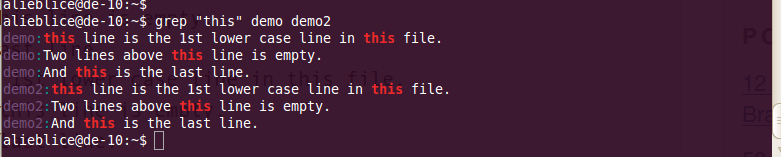
همون طور که در بالا میبینین اول هر خط نوشته که هر خط ماله چه فایلی هست
دستور بالا رو میتونین به این صورت هم بنویسین
کد:
alieblice@de-10:~$ grep "this" demo*
حساس نبودن به حروف بزرگ و کوچک بوسیله i-
در حالت عادی grep حساس به حروف بزرگ و کوچک هستش اگه با i- برای the جستوجو کنیم تمام کلمات THE و The و the رو شامل میشه
a
کد:
lieblice@de-10:~$ grep -i "the" demo
THIS LINE IS THE 1ST UPPER CASE LINE IN THIS FILE.
this line is the 1st lower case line in this file.
This Line Has All Its First Character Of The Word With Upper Case.
And this is the last line.
alieblice@de-10:~$
4

استفاده از regular expression در grep
grep به خوبی از regular expression پشتیبانی میکند که روش استفادشم مثل مثال اول هستش
اطلاعات بیشتر در مورد regular expression رو از ادرسهای زیر میتونین بخونبن
Regular Expressions in Grep Command with 10 Examples – Part I
Advanced Regular Expressions in Grep Command with 10 Examples – Part II
کد:
http://www.grymoire.com/Unix/Regular.html
مثال
alieblice@de-10:~$ grep "lines.*empty" demo
Two lines above this line is empty.
alieblice@de-10:~$
5

در بالا grep برای هر چیزی که با lines شروع بشه و با empty به پایان برسه که در بینشون هر چیزی میتونه باشه جستو جو میکنه
جستوجو فقط برای کلمه خاصته شده
اگه با grep کلمه is رو جستوجو کنیم کلمات زیر رو هم جزو خروجی میاره
“is”, “his”, “this”
حالا اگه بخایم که فقط دنبال is بگرده از w- میتونیم استفاده کنیم
عکس grep با اپشن i-
6

عکس grep با اپشن w-
کد:
alieblice@de-10:~$ grep -iw "is" demo
THIS LINE IS THE 1ST UPPER CASE LINE IN THIS FILE.
this line is the 1st lower case line in this file.
Two lines above this line is empty.
And this is the last line.
alieblice@de-10:~$
7]

نشون دادن چند خط قبل یا بعد یا دوروبر نوشته پیدا شده -A, -B and -C
برای این قسمت فایل demo3 رو بسازین
نشون دادن N خط بعد نوشته تطبیق شده با استفاده از A-
کد:
alieblice@de-10:~$ grep -A 3 -i "example" demo3
Example to show the difference between WORD and word

 * 192.168.1.1 - single WORD
 * 192.168.1.1 - seven words.
alieblice@de-10:~$
8

نشون دادن N خط قبل از نوشته تطبیق شده با استفاده از B-
کد:
alieblice@de-10:~$ grep -B 2 "single WORD" demo3
Example to show the difference between WORD and word

 * 192.168.1.1 - single WORD
alieblice@de-10:~$
9

نشون دادن چند خط دورو بر نوشته تطبیق شده با استفاده از C- ((سی بزرگ))
کد:
alieblice@de-10:~$ grep -C 2 "Example" demo3
word - word consists of a sequence of letters, digits and underscores.

Example to show the difference between WORD and word

 * 192.168.1.1 - single WORD
alieblice@de-10:~$
10

جستوجو در داخل تمام فایل ها و ساب دایرکتوری ها با استفاده از r-
بر عکس کردن جستوجو با استفاده از v-
با این کار تمام خط هایی که با کلمه تطبیق نیافته اند نشون داده میشن
کد:
alieblice@de-10:~$ grep -v "go" demo3
4. Vim Word Navigation

You may want to do several navigation in relation to the words, such as:


WORD - WORD consists of a sequence of non-blank characters, separated with white space.
word - word consists of a sequence of letters, digits and underscores.

Example to show the difference between WORD and word

 * 192.168.1.1 - single WORD
 * 192.168.1.1 - seven words.
alieblice@de-10:~$
11
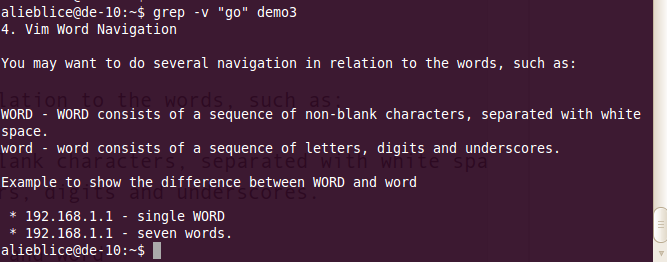
همون طور که میبینین در عکس خروجی رنگی وجود ندارد
جستو جو هم زمان برایه چند نوشته به وسیله e-
برای این کار دستورو به این شکل مینویسیم
کد:
grep -v -e "pattern" -e "pattern"
مثال :
کد:
alieblice@de-10:~$ grep -e "is" -e "line" demo
this line is the 1st lower case line in this file.
This Line Has All Its First Character Of The Word With Upper Case.
Two lines above this line is empty.
And this is the last line.
alieblice@de-10:~$
12]

میتونین خط هایی که هیچکدان از نوشته های مورد نظر رو ندارن هم پیدا کنین که به این شکل میشه
کد:
alieblice@de-10:~$ grep -ve "is" -e "line" demo
THIS LINE IS THE 1ST UPPER CASE LINE IN THIS FILE.
]
13

شمردن خط هایی که نوشته تطبیق شده رو داراست به وسیله c-
کد:
alieblice@de-10:~$ grep -c "go" demo3
6
alieblice@de-10:~$
یا
کد:
alieblice@de-10:~$ grep -c this demo
3
alieblice@de-10:~$
نشون دادن فایل هایی که نوشته مورد نظر درون انها تطبیق شده بوسیله l-
کد:
alieblice@de-10:~$ grep -l this *
demo
demo2
یا
کد:
alieblice@de-10:~$ grep -l this demo*
demo
demo2
نشون دادن خطی که در ان نوشته تطبق شده بوسیله n-
کد:
alieblice@de-10:~$ grep -n "go" demo3
5: * e - go to the end of the current word.
6: * E - go to the end of the current WORD.
7: * b - go to the previous (before) word.
8: * B - go to the previous (before) WORD.
9: * w - go to the next word.
10: * W - go to the next WORD.
alieblice@de-10:~$
16
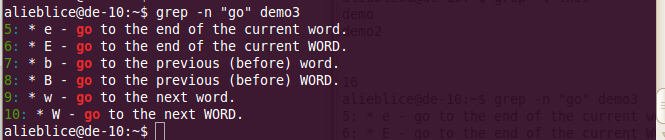
همون طور که میبینین شماره خط رو اول هر خط نوشته
رنگی کردن
به طور پیش فرض grep از رنگ قرمز برای مشخص کردن متن های تطبیق یافته استفاده میکند که در عکس های بالا دیده میشه
حالا اگه بخاین رنگش رو تغییر بدین راحت ترین روش اینه که یک خط مثل خط پایین رپ به فایل
که در home دایرکتوری تون هست قرار بدین (( نکته : اول فایل یک نقطه داره که باعث مخفی شدنش میشه ))
نمونه خط :
کد:
export GREP_OPTIONS='--color=auto' GREP_COLOR='COLOR'
در خط بالا به جای COLOR کد رنگ مورد نظرتونو بزارین
چند نمونه رنگ
کد:
export GREP_OPTIONS='--color=auto' GREP_COLOR='100;8'
17

کد:
export GREP_OPTIONS='--color=auto' GREP_COLOR='1;37;41'
18

کد:
export GREP_OPTIONS='--color=auto' GREP_COLOR='1;32'
19

کد:
export GREP_OPTIONS='--color=auto' GREP_COLOR='7'
منبع :
15 Practical Grep Command Examples In Linux / UNIX
grep: highlighting matches in color








 دستور grep

 پاسخ با نقل قول