







 پاسخ : نصب ویندوز در سرور مجازی هتزنر

Next, the desired image is selected and the setting saved.

Now you can start your server and perform the installation normally up to the point where the installation searches for the drive. At this point, you have to switch the image to the latest available VirtIO driver CD.

Subsequently, the below mentioned drivers need to be installed.
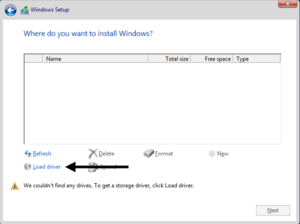

Each of the folders will usually have a subfolder with the architecture (amd64). This must be selected to install the drivers (see above).
After installing the driver you need to switch back to the previously used Windows Image.
Finally, you can resume the installation as normal.


 پاسخ با نقل قول
